Connect Token Saver to your AI host
Choose your harness for exact setup, OAuth, verification, and host instructions, then run the complete tier-first lifecycle.
https://tryelisai.com/mcp, wait for it to report ready, and retry.Choose your harness
Each tab is a complete setup path and has a shareable ?harness=... URL. Do not substitute one harness's endpoint or configuration keys for another.
Codex App setup
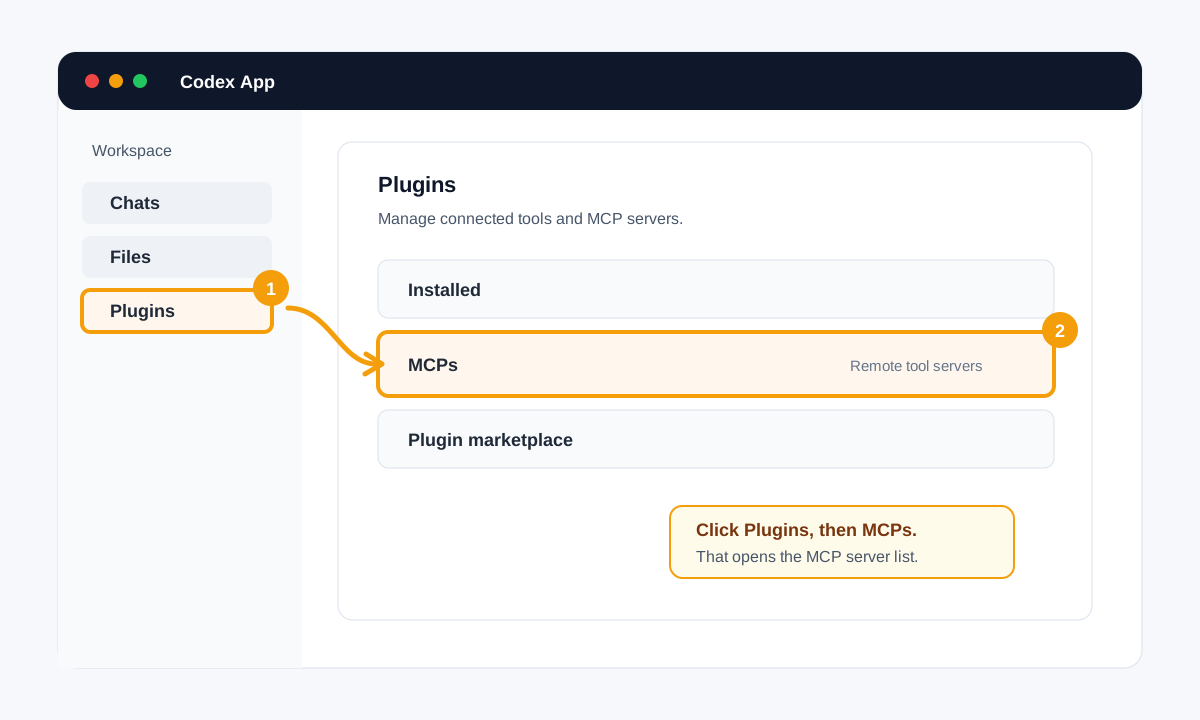
Use this path in the Codex desktop app when its MCP management screen is available.
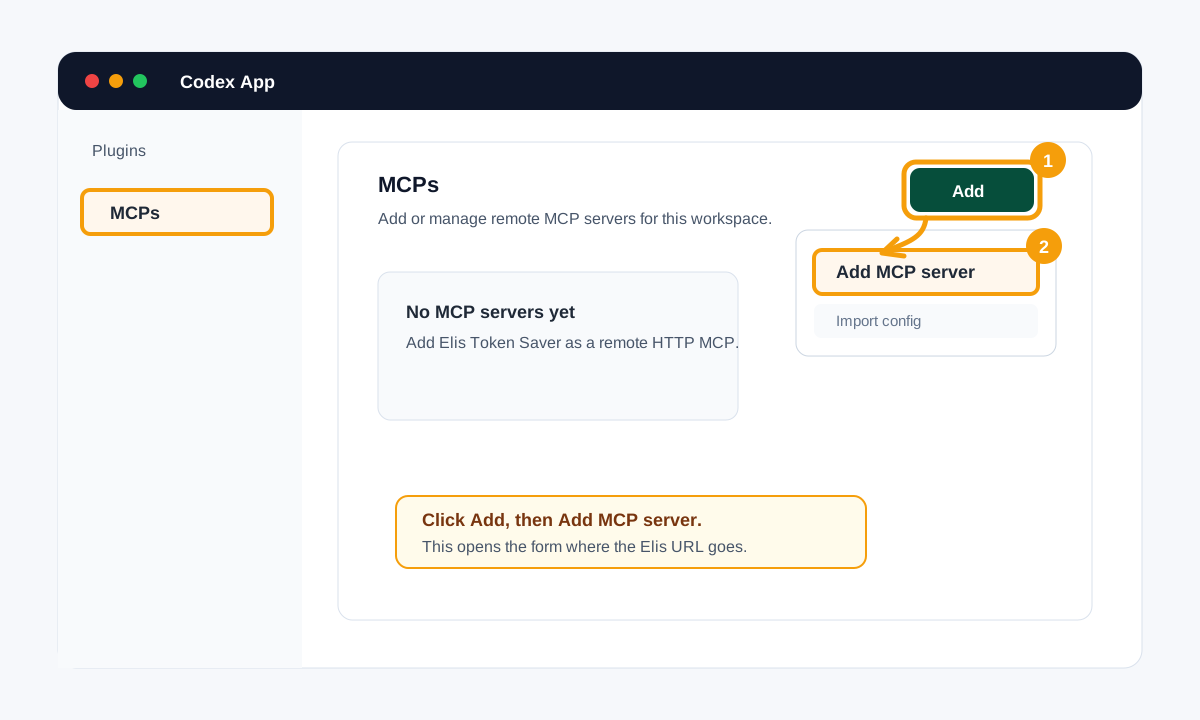
1. Open the configuration
Plugins → MCPs → Add → Add MCP server
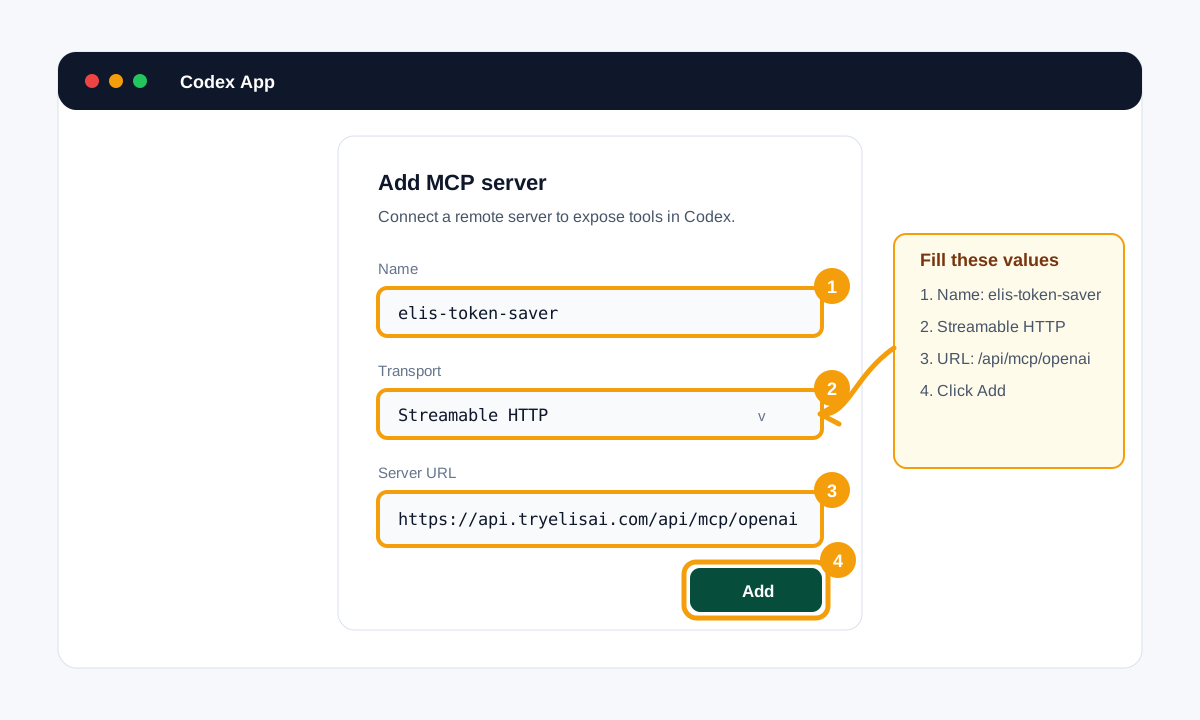
2. Add Elis Token Saver
Name: elis-token-saver
Transport: Streamable HTTP
URL: https://api.tryelisai.com/api/mcp/openai
3. Authorize
- Save the server. If Codex exposes an Authenticate action, use it to open Elis, sign in, and approve the token_saver scope. Otherwise use the programmatic PKCE flow below.
- Choose Personal or an organization on the consent screen. That choice controls billing and private-chain scope.
4. Verify the connection
- Open the MCP server details and confirm the server is connected.
- Start a fresh task and ask Codex to use start_elis_token_saver_plan before substantive work.
- If the tools are missing, restart Codex after installing the host files below.
5. Install the host behavior
.codex/agents/elis.toml
~/.codex/prompts/elis.md
setup_elis_host_instructions previews these files. The executor is project-scoped, but the /elis prompt is user-global because Codex reads custom prompts from $CODEX_HOME/prompts. Keep the always-on rule in AGENTS.md; a project .codex/prompts directory is not loaded.
Endpoint: https://api.tryelisai.com/api/mcp/openai
References: Complete Elis setup reference
Run the complete Elis lifecycle
Connecting the server only exposes tools. The host must still use the same cursor for the whole plan and execute only the tasks Elis discloses. Every ready task includes an authoritative recommended_model_size of nano, small, or frontier. A named model is optional host guidance, not a hardcoded binding.
1. start_elis_token_saver_plan({ goal, constraints?, chain_hint? })
2. submit_elis_task_plan({ plan_id, tasks })       // only when start requests it
3. get_next_elis_task({ plan_id, graph_revision })
4. Execute every ready task using its public execution_handoff and size tier
5. get_next_elis_task({
     plan_id,
     graph_revision,
     previous_result: { task_id, status, output },
     usage: { input_tokens, output_tokens, model, model_tier }
   })
6. Repeat steps 4-5; switch immediately if the server returns a new graph_revision
7. finish_elis_plan({ plan_id, final_answer, total_tokens_used, usage, feedback })execution_handoff, completes that one task, reports actual model and token usage, and returns control. It does not start a second plan.Authorize a host without built-in OAuth
A raw JSON-RPC client must implement OAuth itself. First read public discovery metadata, register a public client, create an S256 PKCE challenge and state, open consent, validate the returned state, exchange the one-time code, and send the access token in the header.
Show the programmatic OAuth checklist
- Read
https://api.tryelisai.com/.well-known/oauth-authorization-server. - POST
{"client_name":"my-host","redirect_uris":["http://localhost:8765/callback"]}tohttps://api.tryelisai.com/oauth/registerand retain the returned publicclient_id. - Generate a random
code_verifier, its base64url SHA-256code_challengewithout padding, and a randomstate. - Open
/oauth/authorizewithresponse_type=code, the exact redirect URI,code_challenge_method=S256, scopeprofile token_saver, the state, and the selected harness endpoint asresource. - Verify state, then POST the code, client id, verifier, exact redirect URI, resource, and
grant_type=authorization_codeto/oauth/token. - Call the selected MCP endpoint with
Authorization: Bearer <access_token>. Keep tokens out of URLs and logs.
The copy-paste requests and refresh-token notes are in the full setup reference.
Use recall and privacy controls deliberately
A successful authenticated finish can store a proven chain privately in the selected Personal or organization scope. Future similar goals can recall that task sequence. Report honest ok, failed, or blocked task status and actual usage so prediction and savings audits compare against real execution.
// Do not store or recall this plan
start_elis_token_saver_plan({ goal, constraints: { no_store: true } })

// Keep private recall, but exclude this plan from community sharing
start_elis_token_saver_plan({ goal, constraints: { no_community: true } })

// Recall a known private proven chain for a similar goal
start_elis_token_saver_plan({ goal, chain_hint: "elis_chain:<sig>:<plan_id>" })Troubleshoot the common failures
- No tools: confirm the exact harness endpoint, Streamable HTTP config, host trust/enablement, and workspace MCP policy. Then refresh tools or restart the host.
- oauth_required or invalid_token: the server is reachable, but the lifecycle is not authorized. Complete authentication again; do not continue anonymously.
- insufficient_scope: authorize again with
token_saverin scope. - payment_method_required: open
https://app.tryelisai.com/billing, attach a payment method to the selected scope, then retry the lifecycle call. - First request times out: wake the API at
https://tryelisai.com/mcpand retry after it reports ready. - /elis missing: apply every file returned by
setup_elis_host_instructionsand start a new host session. Gemini CLI can reload commands with/commands reload. - Plan revision changed: stop work tied to the old
graph_revisionand follow the new ready-task wave.
For tool schemas, usage fields, tier semantics, grounding, and finish behavior, continue to MCP Tools & Tier-First Lifecycle.